5 Stages of AI Mastery for Civil Engineering
From asking a question to an autonomous agent — the 5 stages of AI mastery, rebuilt for civil engineers and infrastructure PMs.

A free beginner workshop for civil engineers and infrastructure PMs.
By Joseph Dib, PE, PMP, Infrastructure Catalyst.
TLDR: Learn the 5 stages of AI mastery, from asking a simple question to an agent that assembles your Monday status report. Work through them in order, on real project artifacts, with a checker discipline at every stage.
If you only use AI as a faster search engine, you are using the smallest part of it. A 2025 Bluebeam survey of 1,000 architecture, engineering, and construction professionals, reported by ASCE, found only 27% use AI in their operations. Most engineers we talk to use it like a faster search box. That is Stage 1. This workshop walks you from there to an agent that pulls your daily reports, RFI log, submittal log, and schedule update, then prepares a draft weekly status report for your review.
The 5 stages:
- Ask AI: Get an answer.
- Think with AI: Find gaps in your plan.
- Teach AI: Show it how you like work done.
- Delegate to AI: Give it a meaningful assignment.
- Automate with AI: Have it repeat the work on a schedule.
Before them sits a Stage 0: set up safely, with an approved tool, the right folders, and the data rule in place.
One rule runs through all six: AI drafts, you check, you own it. The legal name for that ownership is responsible charge, and Stage 0 defines it properly. Nothing an AI produces goes into a deliverable until a person whose name is on the project has checked it. That is not a new rule invented for AI. It is the rule our profession already works under, and this workshop teaches you to keep it while the drafting gets faster.
Our running example: Every Monday, you need a project status report: what happened last week, what is at risk, what is due next. The inputs are scattered: daily reports, the RFI log, the submittal log, the schedule update, last week's report. By Stage 5, an agent assembles the draft. Your job: check it and decide.
If you run an asset management shop instead of a construction project, keep reading anyway. A pavement thread runs through Stages 2, 4, and 5, and the pattern is identical.
Make this workshop yours, and run it with your team. The examples come from California public works because that is my desk. Yours may be a water utility, a transit agency, a port, or a private firm in another state. Give the workshop text to your AI and ask it to adapt the examples, the specifications, and the exercises to your use case. Then work it together, one stage at a time, as team training. A crew that runs the exercises together finds the use cases that matter to its own shop, and finds them faster than anyone working alone. Discovering that together is half the value.
The slides. A 39-slide deck teaches this same workshop in presenting form, one idea per slide: the five stages, the tool landscape, how app subscriptions and Application Programming Interface (API) billing differ, and a closing visual of an agent crew inside a civil engineering firm, supervised by the engineer in responsible charge. The deck is on the Downloads page for subscribers, and it exists for the team version of the workshop: put it on a screen, adapt the examples to your shop with your AI first, and work one stage per session together.
Get the slides and practice files
This article is free to read, right here, no account needed. The slide deck (39 slides) and the eight practice files for the fictional Route 101 / Main St Interchange project are on the Downloads page for subscribers. Subscribing is free: it takes an email address, and then the files are yours to download and run with your team.
Downloads page: https://www.infrastructure-catalyst.com/downloads/
Stage 0: Before you start
Goal: set up safely in about 20 minutes.
- Accounts: use the AI tool your employer has approved. If there is none, use a personal account only with public or made-up data. Stages 1 to 3 work on free tiers. Scheduling needs a paid plan (Claude Pro was $20/month billed monthly as of October 2026; check current pricing).
- Data rule: never upload anything your agency or client has not cleared: unbid plans, bid results before award, personnel information, security-sensitive drawings, resident complaints with names. Only give an AI tool data you are allowed to share. An instruction typed into a chat ("do not share this") is not an access control.
- Folders: make three.
AI-practice/inputsholds read-only copies of source files.AI-practice/draftsis where AI writes.AI-practice/checkedis where you move files after your review. That middle folder matters: drafts and checked work should never mix. - Practice pack: this workshop ships with a fictional project, the Route 101 / Main St Interchange Improvements, and practice files: a week of daily reports, an RFI log, a submittal log, a schedule update, last week's status report, the report instructions, plus a sample pavement management export and budget for the pavement exercises. Use the workshop pack, not your live project, through Stage 4.
- Records: public agency work is subject to the California Public Records Act. Prompts, AI drafts, and chats about a project may be records. Follow your agency's records and AI policy, and write like your words could be read back to you, because they could.
What stays with people, at every stage: engineering judgment, design calculations behind stamped plans, safety calls, and anything that commits your agency to money or time, like approving a contract change order or a time extension. AI can draft, compare, and flag. It does not do those four things.
Stage 0 check:
- [ ] I know which AI tool is approved for work data
- [ ] My three folders exist
- [ ] I have the practice pack
Responsible charge check (every stage)[ ] I checked every number against the source file or spec[ ] Every spec, standard, or test method cited exists, in the edition my contract uses[ ] Guesses are labeled as guesses[ ] Nothing here commits money, time, or a design decision without my own review[ ] I could explain and reproduce this without AI
Stage 1: Ask AI
The most familiar stage: you ask, AI answers. A prompt is the message you type.
AI's answer changes radically when you specify what kind of help you want. Mix these 3 details:
- Role: Who should AI act as? Use the real civil cast: resident engineer, field inspector, agency reviewer, contractor's superintendent, the staffer who has to turn your memo into a city council report.
- Output: What should it make? (e.g., a bullet summary with section references)
- Audience: Who is it for? (e.g., a field engineer who has never read this spec)
Warm-up. Open Claude or ChatGPT. Send each prompt on its own:
Summarize the compaction requirements for aggregate base like I'm a new field engineer.
Summarize the compaction requirements for aggregate base like I'm the agency reviewer checking my work.
Summarize the compaction requirements for aggregate base like I'm writing a one-paragraph email to the contractor's superintendent.
Compare the three answers. Same topic, totally different responses: words, detail, tone. Notice something else: none of them named a specification. Without a spec name, AI mixes Caltrans, Greenbook, AASHTO, and ASTM values into one confident paragraph. That is the trap, and the real exercise springs it.
The real exercise: name the spec.
Using the Caltrans Standard Specifications, Section 26 Aggregate Bases, summarize the compaction requirement for Class 2 aggregate base like I'm a new field inspector. Name the California Test methods. If you are unsure of a value, say so.
Section 26 requires at least 95% relative compaction for Class 2 aggregate base, tested per California Test 231 (nuclear gauges) against the test maximum from California Test 216. Now open Section 26 in the edition your contract uses and check the answer yourself. Did AI get the percent and the test methods right? Did it slip in an AASHTO or ASTM value? Did it invent a section number that looks plausible? AI invents spec sections and standard numbers regularly, and they look right. Catching one here, on a practice question, is the cheapest lesson in the workshop.
Names AI should hear from you. AI answers get better when you name your standards: Caltrans Standard Specifications and Standard Plans, the Greenbook (Standard Specifications for Public Works Construction), the California Manual on Uniform Traffic Control Devices, the Caltrans Highway Design Manual, AASHTO publications, ASTM and California Test methods, ACI 318 and 301 for structures, FHWA guidance. Always add the edition. Specs change editions, and AI often quotes an old one.
The civil rule for Stage 1: AI's answer is a starting point, not a source. Check it against the actual spec, in the edition named in your contract, before you act on it.
Stage 1 check:
- [ ] You tried the 3 warm-up prompts
- [ ] You ran the Section 26 exercise
- [ ] You verified the answer against the real Section 26 and noted anything it mixed in or made up
Responsible charge check (every stage)[ ] I checked every number against the source file or spec[ ] Every spec, standard, or test method cited exists, in the edition my contract uses[ ] Guesses are labeled as guesses[ ] Nothing here commits money, time, or a design decision without my own review[ ] I could explain and reproduce this without AI
Stage 2: Think with AI
Now use AI as your sparring partner, to find your blind spots, riskiest assumptions, and the concerns you are avoiding. Three exercises, all built on the practice pack's real numbers.
Exercise 2A: the recovery plan.
Drainage installation slipped 4 days. Paving prep follows drainage on the same reach. I want to recover the 4 days by starting aggregate base on the north half while drainage finishes the south half. RFI 014 on the inlet elevation has been open 19 days. Two submittals are overdue: the precast inlet shop drawings and the AC mix design. Find my blind spots and risky assumptions. Ask about traffic control, testing, and the critical path.
What good looks like: AI flags that the open RFI may block the inlet and grade work, and that paving cannot start without the approved AC mix design. It asks whether the 4 days sit on the critical path or in float. If you double-shift, it should also raise inspection coverage on the second shift, night work noise permits, lane closure chart windows, material plant hours, and compaction testing at night. Check every point it raises against your schedule and your contract before you commit the crew.
Exercise 2B: the time extension sanity check.
The contractor says the 19-day RFI delay entitles them to a time extension. Under a typical Caltrans-style contract, what would I need to see before agreeing? List the questions, not a decision.
The learning point: AI lists the questions (was the delayed work on the critical path, was notice given on time, what does the weekly statement of working days show). You make the call under the contract. That division of labor is the whole workshop in one exercise.
Exercise 2C: delete before you automate.
The most important sentence in this workshop: before speeding up a task, ask whether it needs to exist. DELETING work is far superior to automating work. One limit: you cannot delete a contract-required record. Dailies, weekly statements of working days, and anything your funding source requires stay. You can delete the internal copies and habits around them.
Here are the 9 sections of my weekly report. Which ones does the contract or the funding source require, and which are habit? Mark anything you are unsure of as "check contract."
One more, when you are preparing to negotiate: take a change order position and argue the other side of the table.
Here is my change order position: [describe it]. Argue the contractor's side against me. Find the three weakest points in my documentation.
Pavement exercise P1 (for asset managers):
Here is my draft 5-year paving program: $2.0M a year, all going to mill and overlay on the worst streets. Find my blind spots. Ask me about network PCI trend, preventive maintenance, utility trench cuts and moratoriums, ADA curb ramp triggers, and funding sources.
What good looks like: AI raises "worst first" versus preventive maintenance, the curb ramp work that resurfacing triggers, and coordinating paving with utility work so a new street is not cut open next year.
Stage 2 check:
- [ ] You ran 2A and checked its points against the schedule
- [ ] You ran 2B and could name what evidence a time decision needs
- [ ] You marked one report section as habit in 2C, or confirmed the contract requires all of them
Responsible charge check (every stage)[ ] I checked every number against the source file or spec[ ] Every spec, standard, or test method cited exists, in the edition my contract uses[ ] Guesses are labeled as guesses[ ] Nothing here commits money, time, or a design decision without my own review[ ] I could explain and reproduce this without AI
Stage 3: Teach AI
AI needs to learn what "good" looks like, the same way a new hire does. You would give a new engineer the goal, useful context, and an example. Then you would review their first attempts and give feedback.
Teach AI with six ingredients:
- Context: Give it the facts it needs.
- Examples: Show what good and bad work look like.
- Clarify: Let it ask questions before it starts.
- Constraints: Set limits (length, format, what to never invent).
- Feedback: Say what to keep and what to change.
- Verify: Check the result before using it.
Notice where the checking lives: in the constraints and in the verify step. Constraints are not bureaucracy. They are the checking criteria, written down before the work starts, when you are calm and the deadline is not.
Two facts belong in almost every civil context you write. First, the contract's order of precedence: Special Provisions control over the Standard Specifications, the plans, and the Standard Plans. AI does not know that unless you tell it. Second, edition control: name the edition of every spec you cite, the one your contract uses.
Day-1 AI is not perfect, just like a new hire is not. Invest a little time daily giving it context and feedback.
The reusable prompt template:
I want you to <GOAL>.
Here's the CONTEXT: _____.
Here's an EXAMPLE: _____.
Here's the CONSTRAINTS: _____.
Ask me 5 CLARIFYING questions before you start.
Worked example: submittal review checklist. Open a new chat and fill it in:
I want you to review this submittal against our checklist and flag every deficiency.
Here's the CONTEXT: This is a concrete mix design submittal under Caltrans Standard Specifications Section 90, as modified by our Special Provisions. Special Provisions control over Standard Specs. The reviewer is the Resident Engineer, with the design engineer checking structural items. (On a building job, the same submittal lives under MasterFormat 03 30 00, Cast-in-Place Concrete.)
Here's an EXAMPLE of a good review: [paste 2-3 lines from a real review you wrote, specific, citing spec sections].
Here's the CONSTRAINTS: Cite the spec section for every deficiency, and cite only sections that appear in the files I gave you. If you can't find the section, write "section not found." Never approve by implication: list each item as Compliant / Deficient / Missing. Max 300 words.
Ask me 5 CLARIFYING questions before you start.
Answer its questions. Read the draft. Give feedback:
Remove the generic items. Add a check for the mix design submittal date against the submittal schedule.
Keep giving feedback until you like the output. Then send this in the SAME chat:
Create a SKILL based on our chat, so I don't have to repeat myself.
A skill is a saved set of instructions AI can reuse. Skills work in regular Claude chat (turn on code execution and file creation in settings), plus Claude Cowork and Claude Code. ChatGPT has a similar feature. Test it in a new chat:
Use my submittal-review skill on this submittal package. Ask me for any facts you need.
If it missed something, give feedback and ask it to update the skill. Continuous, consistent feedback.
A second skill worth building once this one works: a PCI briefing skill (Pavement Condition Index, the 0 to 100 pavement score) that turns a pavement management export into the one-page briefing in Stage 4.
Stage 3 check:
- [ ] Draft improved through feedback
- [ ] Skill saved
- [ ] Skill tried in a new chat
Responsible charge check (every stage)[ ] I checked every number against the source file or spec[ ] Every spec, standard, or test method cited exists, in the edition my contract uses[ ] Guesses are labeled as guesses[ ] Nothing here commits money, time, or a design decision without my own review[ ] I could explain and reproduce this without AI
Stage 4: Delegate to AI
So far you have worked inside a chat. Now delegate a meaningful unit of work: multiple files, multiple steps.
Our assignment: the Monday status report. Gather these 5 inputs from your current project into one folder, or use the practice pack, which contains the same five files for the fictional Route 101 project:
daily-reports-week-42.pdf(last week's dailies)rfi-log-export.csvsubmittal-log-export.csvschedule-update-week-42.pdflast-week-status-report.pdf+ your review rules
Before you delegate, look at the exports yourself for a minute. Log exports carry merged cells, blank dates, and the occasional duplicate RFI number. AI reads them as gospel. A quick scan tells you which numbers to double-check later.
The practice pack is seeded with the problems real logs have. One RFI has been open 19 days with no response. Two submittals are overdue. Drainage is down 4 days on the schedule update, and a water line conflict shows up in Wednesday's daily. A good status report surfaces all of that without being asked. Judge the draft against those facts first; they are your known-answer test.
Use the Stage 3 prompt structure:
I want you to prepare our weekly project status report and lookahead agenda.
Here's the CONTEXT: This folder contains last week's daily reports, the current RFI and submittal logs, the schedule update, and last week's status report. Compare progress, identify what slipped, check previous action items, and flag anything needing a decision this week.
Here's an EXAMPLE: Follow the structure and level of detail in last week's status report.
Here's the CONSTRAINTS: Keep it under 2 pages. Cite the source file for key figures. Flag missing information: never fill gaps with guesses. Save the new report without overwriting the inputs.
Ask me 5 CLARIFYING questions before you start.
VERIFY the output like a checker:
- Open the AI's report.
- Does it show RFI 014 open 19 days? Count it yourself in
rfi-log-export.csv. - Does it show exactly 2 overdue submittals? Sort the log by due date and confirm.
- Does it say drainage slipped 4 days, and does it say whether that hits the critical path or only uses float? If the schedule doesn't say, the report must say "not shown."
- Check the rows a real status report carries: working days used versus allowed, pending contract change orders, the last progress pay estimate amount, and any notice of potential claim. If a figure is not in the files, the report should flag it as missing, not estimate it.
- Check every conclusion has evidence in the files. A slipped activity is a fact; why it slipped might be a guess. Label guesses as guesses.
- Confirm the 5 input files are unchanged.
- Give feedback and corrections.
Then save what worked:
Create a SKILL based on our chat, so I don't have to repeat myself.
Test it in a new chat with a fresh folder:
Use my weekly-status-report skill on this folder.
Pavement exercise P2: the Monday pavement briefing. Same delegation pattern, different desk. PCI (Pavement Condition Index) is a 0 to 100 score. Many California cities compute it with the Metropolitan Transportation Commission's StreetSaver; the PCI method itself is in ASTM D6433 (roads and parking lots). Treatment bands differ by agency; your pavement management program sets them. The sample export in the practice pack is made up, so nothing real leaks.
Using pms-export-sample.csv and budget.csv, draft a one-page Monday briefing: network average PCI weighted by area, segments that dropped more than 10 points since the last survey, this year's program spend versus budget, and 3 decisions needed. Show the formula for every number. Don't recommend treatments; list candidates by PCI band from my decision tree.
Verify the way you verified the status report: recompute the area-weighted PCI in a spreadsheet. AI often gives a simple average instead, which overweights short segments. AI drafts a list for you to check against your pavement management decision tree. It does not select treatments.
Stage 4 check:
- [ ] New report saved
- [ ] Numbers checked against sources, including RFI 014 and the 2 overdue submittals
- [ ] Guesses labeled as guesses
- [ ] Report skill saved
Responsible charge check (every stage)[ ] I checked every number against the source file or spec[ ] Every spec, standard, or test method cited exists, in the edition my contract uses[ ] Guesses are labeled as guesses[ ] Nothing here commits money, time, or a design decision without my own review[ ] I could explain and reproduce this without AI
Stage 5: Automate with AI
Turn the tested skill into an agent that runs on a schedule, preparing a draft for you to review.
Give it tools. Without tools, you would manually export the logs every Monday. Better: connect the agent to the apps you use. Claude calls them Connectors; ChatGPT calls them apps, found in its Plugin Directory. Both let AI read your other systems. The names change often, so look for "connect an app" in settings.
Civil versions: your email (dailies arrive by email), Procore, Autodesk Forma Build (formerly PlanGrid), or your agency's construction management system (e-Builder, Kahua).
Safety first: while learning, connect with read-only access. Disable write and delete actions. Test with:
Read the latest 3 records from [app]. Show their dates and sources. Don't change or send anything.
Then schedule it. In your tested task:
Create a scheduled task to run my "weekly-status-report" skill every Monday at 7:00 AM Pacific time.
Review the schedule popup: correct week, correct time zone, and confirm it reads from the right connected source, for example the project's shared drive folder. Test with "Run now" before relying on it.
An agent on a schedule is a junior engineer who never sleeps and never carries responsible charge. It prepares; you decide. The moment its draft stops getting your full checker pass, the schedule is running you, not the other way around.
Pavement exercise P3: schedule the Stage 4 pavement briefing monthly, read-only on the pavement export folder, with the draft landing in your drafts folder. Same rule: it prepares, you decide.
Final check: [ ] Correct week · [ ] New report · [ ] Verified figures · [ ] Correct schedule
Responsible charge check (every stage)[ ] I checked every number against the source file or spec[ ] Every spec, standard, or test method cited exists, in the edition my contract uses[ ] Guesses are labeled as guesses[ ] Nothing here commits money, time, or a design decision without my own review[ ] I could explain and reproduce this without AI
How the stages map to the status report:
- Stage 0: Approved tool, three folders, practice pack.
- Ask: What belongs in the report?
- Think: What risks am I overlooking?
- Teach: Here are the rules and an example.
- Delegate: Use these files to prepare it.
- Automate: Repeat the checked process each Monday.
Your next task after this workshop. Pick 1 recurring task that takes you 30 to 60 minutes a week. Real desk artifacts from civil practice: submittal reviews, RFI responses, contract change order narratives, daily extra work reports, progress pay estimates, the weekly statement of working days, time extension analyses, notices of completion and punch lists, council staff reports, pavement management budget scenarios. Then:
Interview me about how I do [task], from start to finish. Ask 1 question at a time. Then help me write the goal, context, examples, and constraints for a reusable skill.
Teach it, test the skill, add tools and a schedule only after you trust the result. That sequence, teach, test, then automate, is the habit that makes all of this work.
The formula: AI Leverage = Your Skill × Your Clarity. Your skill = knowing the job, checking work, giving feedback. Your clarity = goal, context, examples, constraints.
Slide deck
The slide deck for this workshop (PDF, 39 slides) is on the Downloads page for subscribers, free to join: https://www.infrastructure-catalyst.com/downloads/
Two ways to pay for AI
Everything in this workshop so far happens in an app: you open ChatGPT or Claude, you type, it answers. That use runs on a subscription, a flat monthly fee with usage limits, the way a software license works.
The second way is the API, the Application Programming Interface. An API is how software, not a person, calls the AI: your program sends text in and gets text back, using a secret key tied to your account. API use is billed by the token, roughly three quarters of a word, counting both what you send and what comes back. It is charged separately from any subscription: a Claude Pro or ChatGPT Plus plan does not include API use, and API use does not need one. Separate dashboard, separate meter, separate bill.
Why it matters here: chat answers are cheap and flat. Agents are metered. A single answer costs a few thousand tokens. An agent that reads five files, plans, drafts, and revises can use a hundred times that per run, and a scheduled agent runs whether you watch it or not. The money is still small next to an engineer's hour, but it is a real operating cost, so treat it like one: set a monthly spending limit on the API account, read the usage dashboard the way you would read a consultant's invoice, and know which of your automations spends what. Stages 1 to 4 live comfortably in the app. Stage 5 is where the meter starts.
After the five stages: running agentic systems
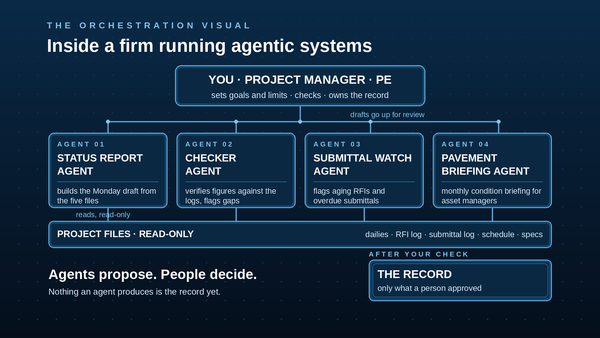
The five stages teach you to work with one AI, then one agent, under your check. The next step, and it is a step up in kind, not just degree, is learning to run agentic systems: several agents, each with a defined job, working a whole process together.
Think of the move you already know. A junior engineer runs a calculation. A project manager runs the people who run the calculations: sets the assignments, defines what good looks like, checks the checkpoints, owns the result. Orchestration is that move, applied to agents. One agent drafts the status report. Another checks its figures against the logs. A third watches the submittal queue and flags what is aging. Your job stops being prompting and becomes supervising: goals, territories, limits, and checks.
The rules do not change when the crew grows. Agents propose, people decide. Every agent gets a territory and a human checker, the same way every engineer gets an assignment and a reviewer. The record is what a person approved, not what an agent produced. And you scale the checking before you scale the automation, because an unchecked system does not make one mistake. It makes the same mistake every Monday at 7:00 AM.
Master the AI first. Then master running the system. That second mastery is where this profession is heading, and it is management work, which means it belongs to the people willing to stay in responsible charge of it.
FAQ (civil edition)
Do I need coding skills? No. You give instructions in plain English and point at a folder.
Does it cost money? The agent and scheduling features need a paid AI plan (Claude Pro was $20/month billed monthly as of October 2026; check current pricing). Skills and basic connectors work on free plans, and Stages 1 to 3 work on free tiers.
What's the difference between a skill and an agent? A skill holds reusable instructions for a job. An agent uses instructions plus tools to do the job on a schedule.
How do I know the report is accurate? Check the numbers and the story separately. Recalculate key figures from the logs. Then check whether the evidence supports each conclusion. A 19-day RFI aging is a fact; blaming it on the reviewer might be a guess.
Who is accountable when AI gets it wrong? A person, always, and in California the legal frame has a name: responsible charge. Business and Professions Code section 6703 defines it as "the independent control and direction, by the use of initiative, skill, and independent judgment, of the investigation or design of professional engineering work." It covers work you sign or send, stamped or not; status reports and RFI logs are not exempt because no stamp touches them. You are in responsible charge of anything you sign or send. AI is a tool, like your CAD or your spreadsheet. You must be able to check, explain, and reproduce every number it gives you. Board rules (Title 16, California Code of Regulations, section 404.1) describe what that control must look like, and national guidance (the National Council of Examiners for Engineering and Surveying, Position Statement 6.10) says the same: the licensee keeps full responsibility for AI-assisted work. Keep the inputs, the report, and your corrections so you can trace any mistake. When something goes wrong, fix the skill before the next run.
What about sensitive project data? Stage 0 covers it: an approved tool, a dedicated folder containing only what the task needs, read-only access plus a separate folder for drafts. Telling AI "don't change anything" is an instruction, not an access control; enforce it with permissions. And remember the records point: on public work, assume your prompts and drafts may be public records under the California Public Records Act.
How do I measure ROI? Log your own time for two weeks instead of trusting anyone's numbers. Time yourself doing the status report manually, then measure input prep plus review time with AI. Example only: if manual takes 2 hours and AI-assisted takes 30 minutes of your attention, that is 1.5 hours back weekly on one report. Your logs tell you whether your number looks anything like that.
When is an agent overkill? Use fixed rules for predictable work (calculating percent complete). Use AI for messy work (synthesizing dailies, RFIs, and schedule narrative into a story). If every step is predetermined, you don't need an agent. You need a spreadsheet.
References
- Sabrina Ramonov, "5 Stages of AI Mastery", the framework this workshop adapts.
- Pascal Bornet, "The Human-Agent Orchestrator" (2026), the orchestration ideas behind the closing section.